
Download Zivy Listens – AI‑Powered Audio Summarizer for Mobile
Overview
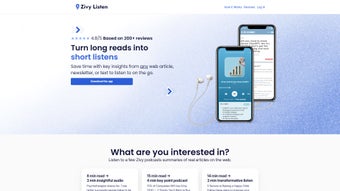
Zivy Listens is an innovative AI‑driven tool that turns written content into engaging audio podcasts. Designed primarily for mobile platforms, the app leverages the latest GPT models to read, summarize, and narrate articles, PDFs, and plain‑text documents in a matter of seconds. The core promise is simple yet powerful: transform a 20‑minute read into a 5‑minute listen, freeing up time for busy professionals, students, and commuters.
What sets Zivy Listens apart from generic text‑to‑speech converters is its deep focus on academic papers and research articles. The AI extracts key insights, highlights methodology, and even presents conclusions before you finish the first sentence, making it an indispensable companion for anyone who needs to stay on top of the latest studies without drowning in dense text. The user interface is clean, intuitive, and fully optimized for iPhone, Android, and desktop browsers, allowing seamless uploads from any device.
Customizable listening experiences let you choose specific sections—such as abstracts, summaries, or full conclusions—while a built‑in note‑taking feature lets you bookmark important moments for later review. High‑quality, natural‑sounding voice output ensures that the listening experience feels like a professionally produced podcast rather than a robotic read‑out. Whether you are commuting, exercising, or simply prefer auditory learning, Zivy Listens offers a secure, fast, and free (with optional premium upgrades) solution that enhances productivity and promotes better reading habits.
Key Features & Compatibility
- AI‑powered summarization that reduces long reads by up to 75 %.
- GPT integration for intelligent extraction of abstracts, methodology, and conclusions.
- Support for multiple file formats: web URLs, PDF, DOCX, TXT, and markdown.
- Customizable playback – choose summary, abstract, full article, or specific sections.
- High‑fidelity, natural‑voice audio output with adjustable speed and pitch.
- Built‑in note‑taking and highlight system synced across devices.
- Secure cloud storage for uploaded documents with end‑to‑end encryption.
- Cross‑platform availability: iOS, Android, Windows, macOS, and Linux browsers.
- Offline mode – download audio files for later listening without internet.
- Regular free updates and premium features (ad‑free, batch processing, advanced analytics).
Operating System Support
Zivy Listens runs natively on iOS 14+ and Android 8.0+ through dedicated apps available in the Apple App Store and Google Play Store. For desktop users, a responsive web application works flawlessly on the latest versions of Windows 10/11, macOS 12+, and popular Linux distributions via Chrome, Edge, or Firefox. The cloud‑based architecture ensures that the same AI engine processes documents regardless of the device, delivering consistent performance and audio quality across all platforms. System requirements are minimal: at least 2 GB RAM and 100 MB of free storage for the app, plus an internet connection for the AI summarization step (offline mode only requires previously generated audio files). Because the processing happens on secure servers, the client side remains lightweight, making Zivy Listens suitable for older smartphones and low‑spec laptops without compromising speed or accuracy.
Installation & Usage Instructions
Step‑by‑Step Installation
- Visit the Apple App Store or Google Play Store and search for “Zivy Listens”.
- Tap “Get” or “Install” and wait for the download to complete (≈30 MB).
- Open the app and grant permissions for file access, microphone (for note‑taking), and notifications.
- Create a free account using your email or sign in with Apple/Google for seamless syncing.
- Complete the quick onboarding tutorial that demonstrates how to upload, select sections, and start playback.
How to Convert Content into Audio
Once installed, using Zivy Listens is straightforward. Tap the “+” button on the home screen to import a document. You can paste a web URL, select a PDF from your device, or upload a DOCX file from cloud storage services like Google Drive or Dropbox.
After the file is uploaded, the AI begins analyzing the text in the background (usually under 15 seconds for a 10‑page PDF). A preview screen appears, showing extracted sections such as “Abstract,” “Key Findings,” and “Full Summary.” Choose the portion you want to listen to, set your preferred voice (male/female, regional accents), and adjust the playback speed (0.75×‑1.5×). Press “Generate Audio” and the app will synthesize a high‑quality MP3 file that can be streamed instantly or saved for offline listening.
Advanced Tips for Power Users
The premium version unlocks batch processing, allowing you to queue multiple documents for simultaneous conversion—a feature especially useful for researchers handling dozens of papers. You can also enable “Smart Highlights,” which automatically tags important sentences during playback and adds them to a searchable note list. For educators, the “Lecture Mode” merges several summaries into a single podcast, complete with timestamps for each section.
All generated audio files are stored in the “Library” tab, where you can create playlists, share links via email, or export MP3s to external apps. The app syncs notes and playback progress across all devices, so you can start listening on a commuter train and finish on a desktop without losing your place. Finally, regular updates are pushed automatically; the app checks for new AI models and voice packs weekly, ensuring you always benefit from the latest improvements.
Pros, Cons & Frequently Asked Questions
Pros
- Significant time savings by condensing long reads into short audio.
- AI summarization is context‑aware, especially for academic papers.
- Cross‑platform support ensures flexibility for any device.
- High‑quality, natural‑sounding voices enhance listening experience.
- Built‑in note‑taking and highlight system improves retention.
- Secure cloud processing with end‑to‑end encryption protects sensitive documents.
- Free tier available; premium upgrades are reasonably priced.
Cons
- Initial summarization requires an internet connection.
- Free version includes occasional non‑intrusive ads.
- Complex tables and figures may not be fully captured in audio.
- Premium features (batch processing, advanced analytics) are behind a subscription.
- Audio generation for extremely large documents (>100 pages) can take longer.
FAQ – Frequently Asked Questions
Can Zivy Listens handle copyrighted material?
Yes. The app processes files on secure servers and does not store the original content after the audio is generated. However, you should only upload material you have the right to use, as the service respects copyright laws.
What voice options are available?
Zivy Listens offers a selection of natural‑sounding voices in several languages and accents (US English, UK English, Australian, Canadian, Indian, etc.). Premium users gain access to additional premium voice packs, including celebrity‑style narrations.
Is there a limit to the size of documents I can upload?
The free tier allows uploads up to 15 MB (approximately 30 pages of PDF). Premium users can upload files up to 100 MB, which covers most academic papers and reports.
How does the note‑taking feature work?
During playback, you can tap the “Bookmark” icon to capture timestamps and add short text notes. All bookmarks appear in the “Notes” tab, where you can edit, reorder, or export them as a CSV file for reference.
Can I use Zivy Listens offline?
Yes, once an audio file is generated it can be downloaded for offline listening. The summarization step itself still requires an internet connection, but playback and note review work entirely offline.
Conclusion & Call to Action
Zivy Listens bridges the gap between reading and listening, offering a fast, secure, and AI‑enhanced way to stay informed on the go. Its focus on academic content, combined with flexible playback options and a robust note‑taking system, makes it a standout tool for students, researchers, and busy professionals alike. While a modest internet requirement and occasional ads in the free version are minor trade‑offs, the overall value—especially with the affordable premium tier—far outweighs these concerns. If you’re looking to convert lengthy articles, research papers, or PDFs into concise, high‑quality podcasts, Zivy Listens delivers exactly that. Download the app today, start turning your reading list into a listening list, and experience a new level of productivity.



.png)



